Half a Year with AI: Picking My Tools
In this post I tried to collect everything I worked with every day over the last six months. Coding, a household assistant, image and audio generation, model subscriptions. Which tools didn't stick, and which I came back to and didn't regret.
Pair programming
For coding I almost immediately moved from Claude Code to OpenCode, and not just for code. Editor GUI integration, whether in VS Code, Zed, or Cursor, never worked for me. Maybe it's fixed now, but I don't feel like trying yet.
WSL2 and Zed
At first everything ran on Windows, and I didn't even realize how badly my harness worked. Double edits, crooked PowerShell commands, attempts to yank bash from under Windows. The agent spun its wheels on flat ground and ground through tasks against tool errors. So I moved my projects into WSL, under a proper Ubuntu 26.04.
It didn't click on the first try: tooling and agents lagged, the editor couldn't show the project properly. The culprit turned out to be the mount into the Windows disk, that I/O is insanely slow. Everything moved inside the WSL disk, terminal work too, and, surprisingly, it got acceptably fast. It's a VM, after all.
And as the editor, instead of VS Code and VSCodium, I took the one that does remote connections out of the box. Guess which. Zed.
Ask whether it was worth building this zoo, I could've just gotten an M-chip MacBook and been happy. I agree, I added it to the wishlist. But seriously, I don't regret figuring it out on my home PC, which my wife and I also play games on. I worked on macOS for years and, if you can, I'd advise getting it right away. But the PC and Windows 11 experience came in handy too, and it's mine.
pi: a second chance
With pi it was funny. Six months ago I immediately tried to move all my tasks onto it: rewrite the assistant using its TypeScript SDK, port my opencode plugins. Every pi launch triggered long NPM reinstalls. I tried older versions, couldn't figure it out, and went back to OpenCode. Meanwhile, for the guys on macOS and Linux, everything worked. I blamed my WSL2 and Ubuntu 26.04 and let it go.
On a warm summer day, already married, I gave pi a second chance. Everything worked fast, I immediately remembered the hotkeys and the convenient little things. Right away the ollama cloud extension came in handy: I properly connected cloud models on a subscription. Over time I added the npm and git extensions and a couple of skills, and the client launch didn't slow down. The takeaway is simple: I won't waste time, but if the problem comes back, I'll dig into the cause more carefully.
Setup
A few changes along the way. I swapped the Context7 MCP for their CLI version and the find-docs skill. First I sat on playwright-mcp, then moved to the agent-browser CLI plus a skill, now I'm trying chrome-devtools-axi. The relevance and principles of the MCP -> CLI -> CLI+axi transition are well covered here at axi.md.
Extensions: ponytail for the "lazy" mode, pi-ollama-cloud to keep a fresh list of subscription models, and ollama web search started working out of the box too. pi-codegraph for code navigation. For image analysis: @getpipher/vision, you point vision.json at your default vision model, mine is ollama-cloud/gemma4:31b.
Terminal
Windows Terminal, works well. At first it was just tabs plus Zed and VSCodium terminal sessions. Then I poked at tmux and almost immediately moved to herdr.
SSH from the phone
One more thing, for access to the workstation from the phone.
Here's the setup: a cloudflared agent on the Windows host, openssh-server inside WSL, an ssh://localhost:2222 tunnel into Cloudflare, you add an application in the dashboard and enable browser-based SSH. As a result, the WSL terminal is reachable from the phone.
Why? To always have access to the workstation, even from the phone. Is it convenient? Probably, in exceptional cases or for long controlled sessions. It takes away the anxiety that something is happening without you. On the other hand, you need to rest from work and not build up a "working from the phone" reflex. But it opens an interesting door to new possibilities.
Family assistant and knowledge base
The old setup
The family assistant and knowledge base had their own story. The old setup was fully homemade: an opencode server under the hood and a Telegram connection. It worked fine. Then I tried moving it to pi via the SDK, hypothetically I liked everything, but because of pi's long session launches I had to roll back to opencode.
At some point the opencode setup let me down, I don't even remember why, something after an update. I regret not writing it down. There was a choice: either fix it, or finally try something new. The hyped hermes came to mind.
hermes
I had high hopes for hermes: I thought it'd cover all the assistant's non-coding tasks. It started well, but it's written in Python, which I didn't like from the start, and, oh my god, it periodically CRASHED on my WSL2 and Ubuntu 26.04 system. I tuned the core count, the stack size, rebuilt packages, switched Python versions. Most often it crashed on yaml. I searched for the cause for a long time and never found it: there are config-parsing crashes in the issues, but they weren't related to my problem, while for me everything kept breaking and requiring a manual service restart. The tool goes its own way; I heard it was originally built inside a company for internal use, which is probably why they picked Python. How can this thing be so unstable?
The service just dropped and didn't even try to restart. That approach isn't for me.
By the way, I just saw that kimi-cli got rewritten from Python to TypeScript and packaged as a single binary, now it's kimi-code. Officially for distribution, to hand out one file instead of torturing people with virtual environments. Not because of crashes. And, honestly, we'll see how it affects performance and stability, but it'll definitely make installation easier.
openclaw
Next was openclaw. From mentions in the repo, it's inspired by pi and its author Mario Zechner, special thanks to him for that. For that reason I was even ready for the same problems I hit with pi. But no.
Onboarding went fine, the setup was unusual, but we slowly figured it out and stood up a workspace. After that, not a single crash: the agent is always reachable, does tasks correctly. Maybe over time it needs maintenance and updates, but all the time it's been running, I've seen no problems with it. There were long pauses between uses, and it was always ready. None of that broken state where you confirm everything works, then a month later you write and the agent either doesn't answer, or the access dropped, or the model flew off.
So openclaw works for me, despite the hype around hermes and the criticism of openclaw for stability and security. A caveat: I don't run openclaw in cron or spin wild GOAL loops. It covers routine household requests and works with the family knowledge base as a family chat assistant.
Tools for the household
I have a task of looking after the plants in the house and watering them, I keep all the records of what was watered when and with how much water. At first the assistant and I played "give me a watering plan", I came back with a report "here's what I watered", it updated the registers. But I have about thirty plants, and keeping that kind of log during watering isn't very convenient.
Now I ask it to generate and host a dead-simple HTML page with plant photos, the needed water volume, and a progress tracker. I walk around with the phone, tick the checklist, however's convenient, at the end hit "copy report", check it, and send it to the agent. It, like before, updates the data from the report.
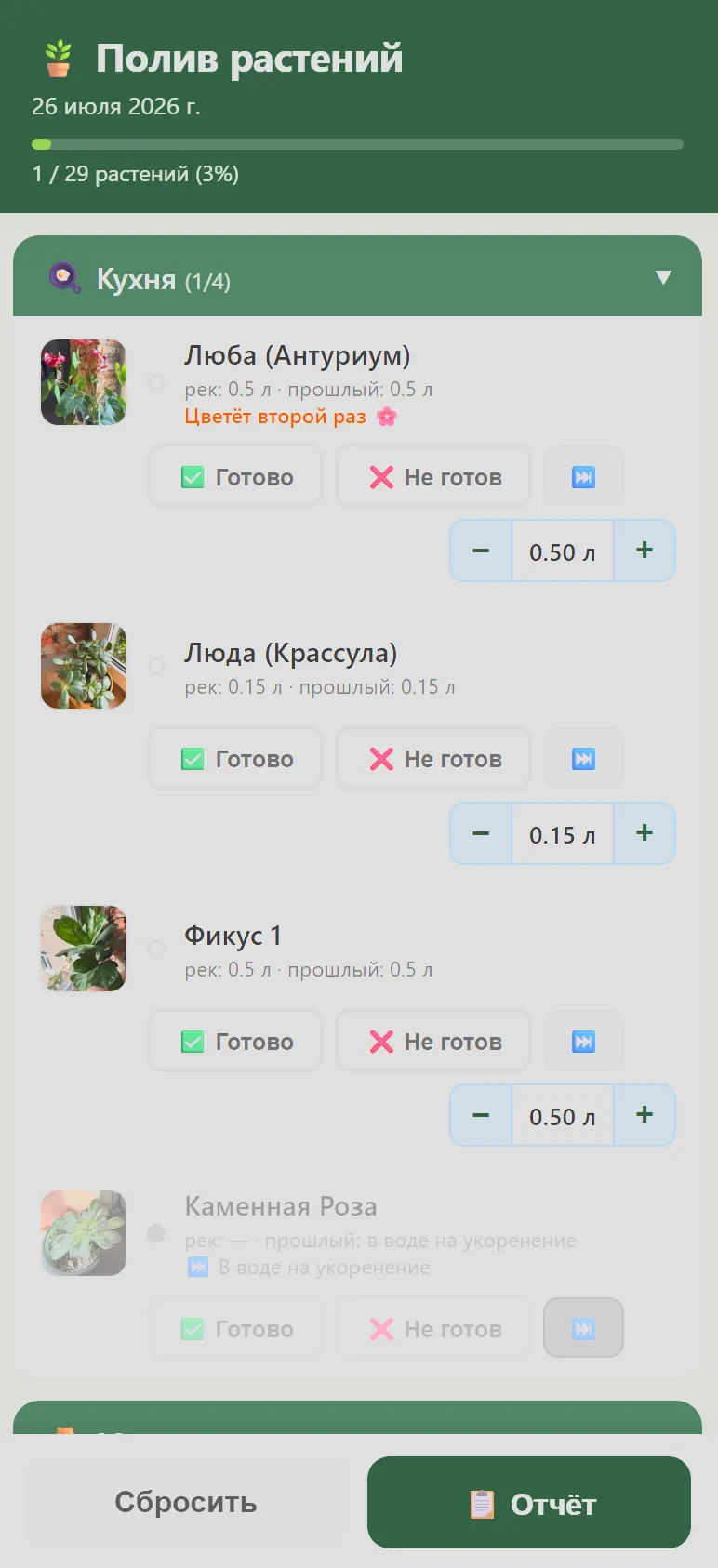
watering checklist by room, progress bar, a "copy report" button.
Same scheme for the honeymoon: the assistant assembled a report page, route, dates, statuses, tracking, all in one artifact.

an example report page of the full current state and tracking for the honeymoon, generated as an artifact from the family knowledge base's info at generation time.
Local models
ollama
I keep local models just in case. There are simple tasks that even a small model chews through without errors. I rarely use them, I don't want to load the home PC. But as a fallback it's useful: OCR and vision, for instance.
comfyui
ComfyUI, just OP. Set up a workflow, exported it for the API, wired it into a script, wrote a skill, and you get free generation of sprites and sound effects. I'm not bragging about the quality, but for prototypes it's genuinely cool: the agent not only writes the prototype code, it also generates the art, crooked and skewed as it may be, but at least not EMOJI, damn!
Right now I'm using Stable Audio 3 for sound effects, FLUX.2 [klein] for images, and RMBG-2 for background removal.
Subscriptions
I used to just ask the chat, but now I work with agents in the terminal, and you need a provider, ideally a cheap one. Here's my experience.
z.ai
The first model I started with was GLM 4.5, and the subscription was cheap, three dollars a month, with perfectly decent limits. A couple of times I even ran loop experiments on weekends, throwaway. Then they canceled that plan and gifted two months of the new lite.
Then GLM 5.2 came out, and the limits started running out very fast. For advanced models z.ai has a quota multiplier: 3x in peak hours (14:00-18:00 UTC+8) and 2x the rest of the time. There was also a promo 1x off-peak until the end of September, but that's temporary. In the end the weekly quota ran out fast, even though it fit into five hours. The subscription became unusable.
ollama cloud (my pick)
Right now I have an ollama cloud subscription for twenty dollars. And the kicker is that it also gives GLM 5.2, and by feel it's about ten times better value than the official z.ai subscription. No peak hours, the multiplier works honestly by GPU-cost: GLM 5.2 just eats more of the limit than DeepSeek-V4-Flash, which eats almost nothing. So the subscription works both for work and for testing the latest popular open-weight models.
opencode go (backup)
I tried opencode go because it's cheap and the scheme is similar to ollama cloud. But the downsides: opencode has no capacity of its own and acts as a router for other providers, and we never learn the exact descriptions of the models or where they run. Plus the monthly limit: five hours a week is fine, but the monthly cap burns out right away. I kept it for a month as a backup in case ollama cloud ran out of limits. Now I see it'd have been better to throw those five dollars into ollama cloud as over-use credits.
kimi k3 (interesting, but no thanks)
Kimi K3. When the model came out, I dropped twenty dollars on the API and got a five-dollar voucher. I wanted to check the quality of its solutions and the speed. The speed leaves something to be desired even over the API, but the correctness and the solutions are genuinely good. I didn't manage to really work with it, but for that price I still need to come up with a task for it, or wait until GLM 5.2 can cover the same thing. The balance ran out pretty fast.
Then I wanted to see how it eats the subscription limits, but subscription sales were temporarily suspended due to the rush of people wanting in. We're waiting for July 27, when they post the weights, and it's interesting whether it'll show up in ollama cloud.
Conclusion
So that's the tool transformation over half a year to a year.
If you want me to go deeper on any tool or use case, write me, I'll be waiting for your feedback!
What's in my stack now
- OS/editor: Windows 11 + WSL2 (Ubuntu 26.04), Zed
- Coding: pi. Extensions: ponytail, pi-ollama-cloud (+ ollama web search), pi-codegraph, @getpipher/vision
- Docs: Context7 CLI + find-docs
- Browser: chrome-devtools-axi
- Terminal: Windows Terminal + herdr
- SSH/HTTP tunneling: cloudflared + openssh-server in WSL
- Family assistant: openclaw
- For running models locally: ollama, ComfyUI
- ComfyUI: Stable Audio 3, FLUX.2 [klein], RMBG-2
- Provider: ollama cloud ($20/mo)